How to Choose the Right Encoder Resolution for Your Application
17.04.2026
Choosing a resolution is always a balance between signal accuracy and stability, not a race to the highest specification numbers. In most cases, I see encoders oversized: their resolution is much higher than the system actually needs. Encoder resolution explained is the main topic of today's guide, where I'll explain how to choose encoder resolution and the optimal setting to ensure your automation operates accurately and doesn't lose pulses at high speeds.
We'll also cover:
- What encoder resolution (PPR/CPR) actually means in real systems;
- How resolution affects accuracy, speed, and signal frequency;
- Why higher resolution is not always better;
- Simple way to calculate the resolution you actually need;
- Field-tested tips to avoid noise, missed pulses, and instability.
What Is Encoder Resolution (PPR/CPR)?
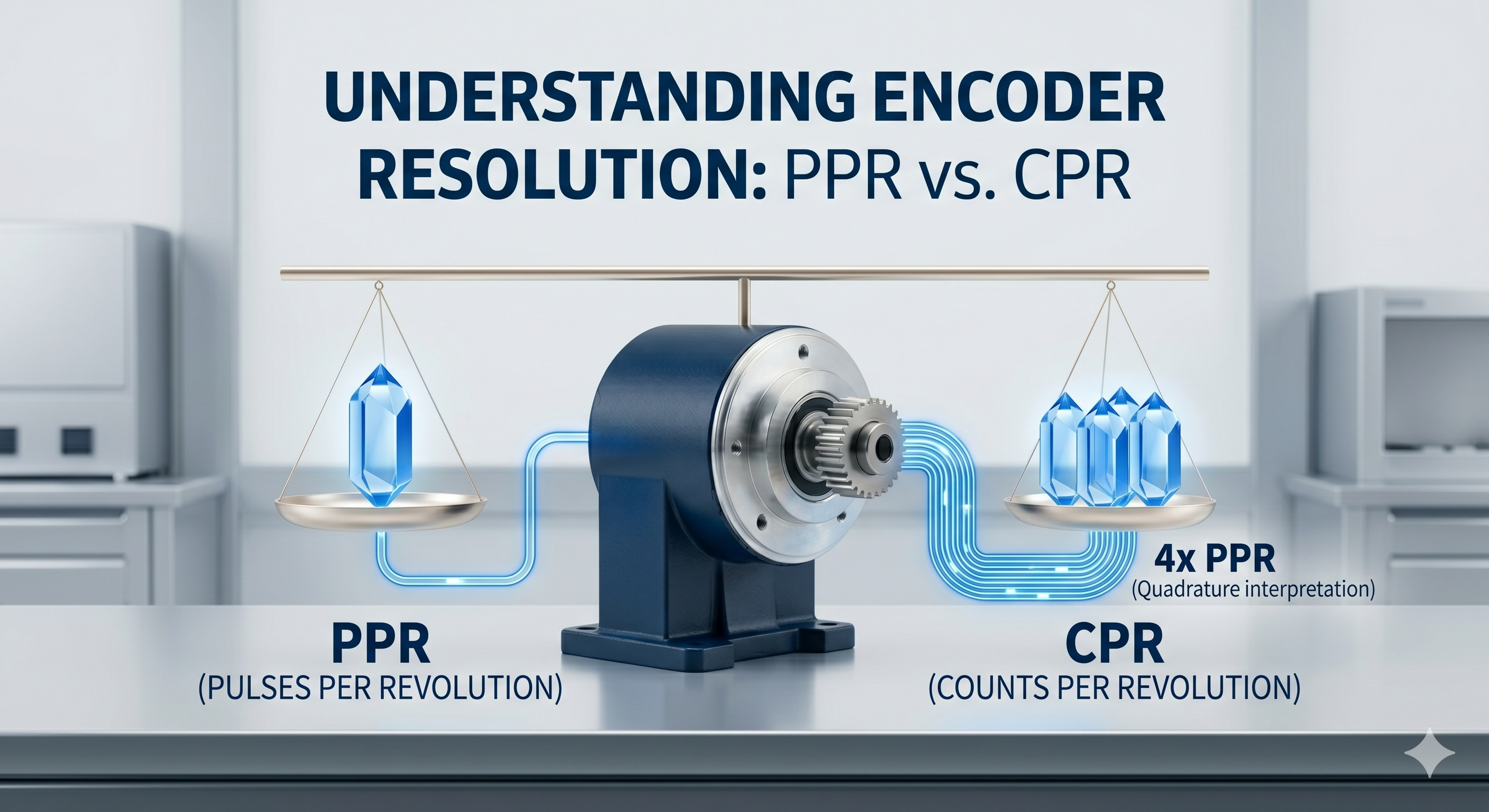
Understanding the distinction between the physical marks on the disc and how your controller interprets them is essential before placing an encoder order. The basic specification, pulses per revolution (PPR), tells you how many electrical pulses will be generated by an incremental encoder for each complete rotation of the shaft. However, in practice, I typically refer to counts per revolution (CPR) instead of PPR since my controller can count each time A and B phase changes state with a quadrature output signal (four times more than the standard PPR).
It’s important to keep in mind that a high incremental encoder resolution corresponds to a small angle of rotation per pulse and therefore affects the minimum step size of mechanical motion. However, I always think about how the sensor is to be used. Incremental sensors count pulses, and for absolute types, their resolution can often be represented as the number of bits per revolution. Knowing this difference helps to match the two devices properly according to the control system's needs.
Looking for the right sensor for your system? Browse our catalog of
Why Resolution Matters (But Not the Way You Think)
Many engineers make the mistake of confusing resolution with accuracy, although these are completely different technical characteristics in real-world use:
- Resolution vs. accuracy. I always explain to my colleagues that encoder resolution vs accuracy are not the same thing, as high resolution only breaks a single revolution into smaller parts but does not guarantee physical accuracy;
- System performance limits. An excessive pulses per revolution encoder will never improve system performance if the mechanical play in couplings or gearboxes exceeds the encoder pitch;
- Controller load issues. Excessive signal detail creates a colossal load on the controller processor, which at some point simply cannot keep up with the incoming data stream;
- Real-world misconception. The main misconception I see in the field is the naive attempt to fix poor or worn-out mechanics by purchasing an expensive encoder with a huge resolution.
The Trade-Off: Resolution vs Speed vs Signal Stability
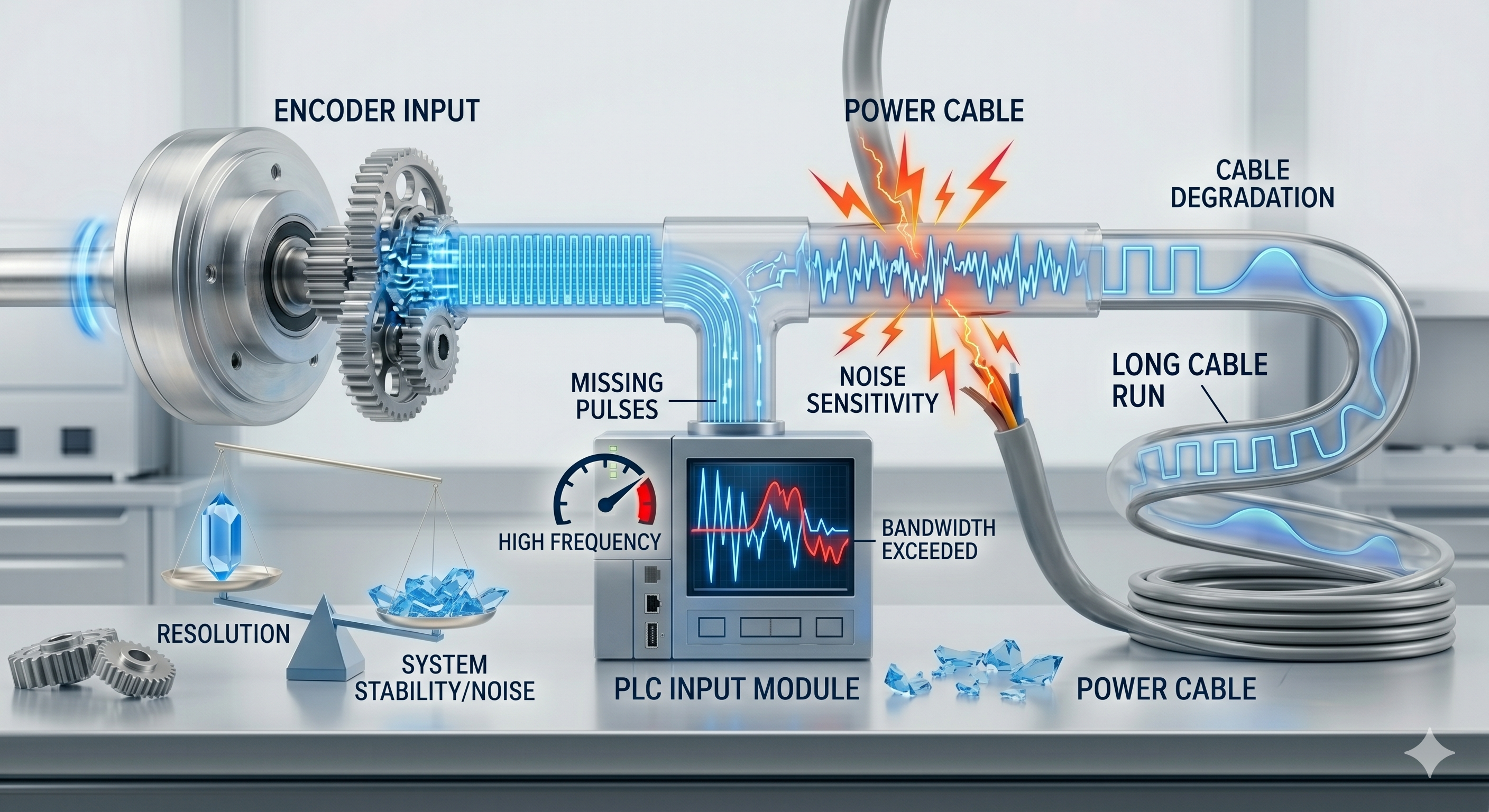
During real-world operation, every extra pulse applied to the shaft can lead to equipment shutdowns due to the physical limitations of the electronics:
- High signal frequency. High resolution at high speeds generates a signal frequency that can exceed the capabilities of the PLC input stage;
- Missing pulses. If the signal frequency is higher than the controller's bandwidth, the system begins to lose data, rendering the motion control encoder resolution useless;
- Noise sensitivity. Short pulses are more difficult to work with, as they become extremely sensitive to electromagnetic interference from power cables;
- Cable degradation. I remember that over long distances, cable capacitance rounds off signal edges, turning clear pulses into unreadable noise.
The Calculation Process
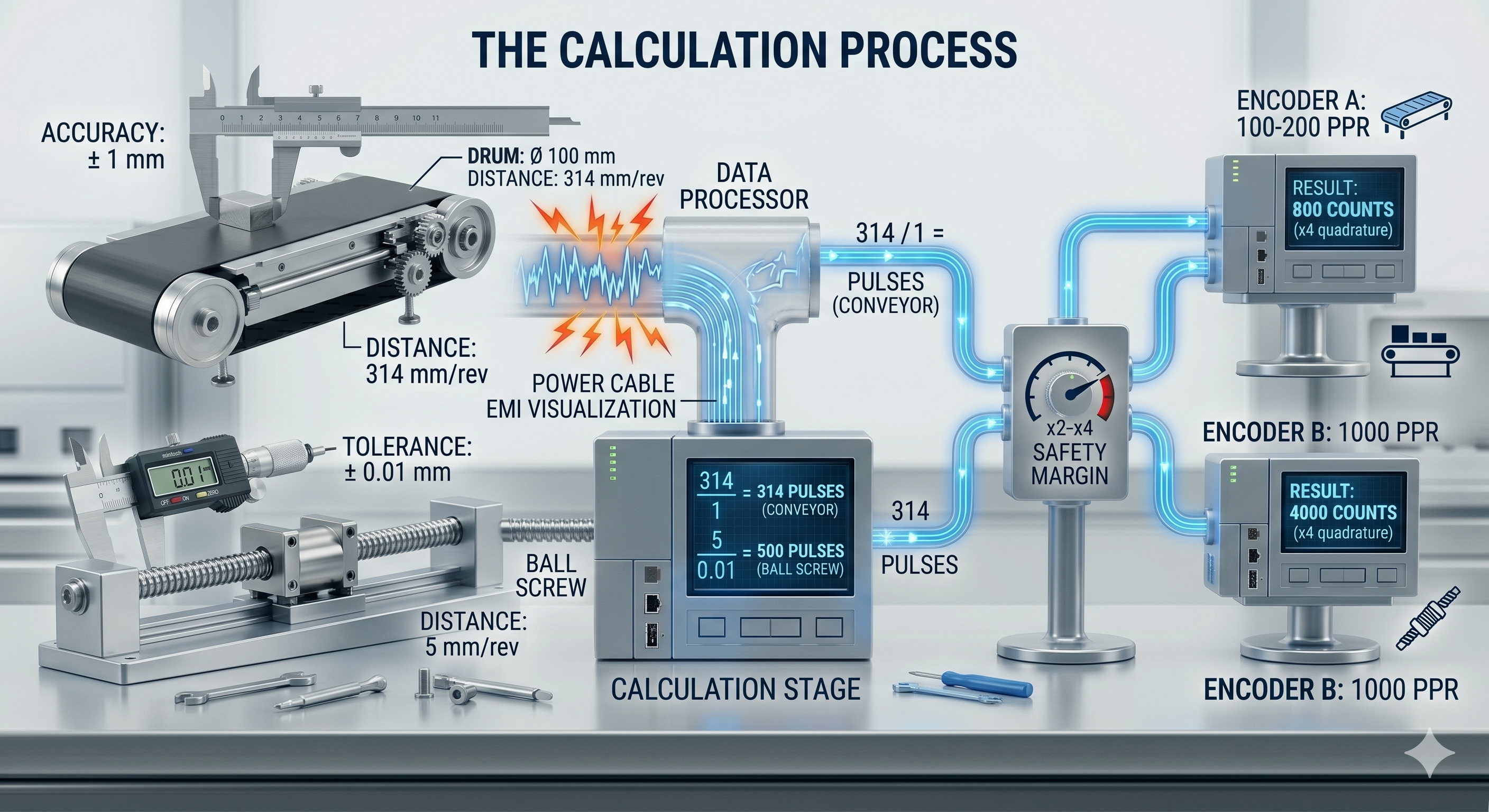
I use a simple sequence of steps and an encoder PPR calculation to accurately determine the required resolution for a specific task.
- Define mechanical accuracy. First, I determine the required output accuracy, for example, conveyor belt movement of 1 mm or ball screw carriage positioning with a tolerance of 0.01 mm;
- Determine shaft rotation. I calculate the distance the echanism travels in one shaft revolution: for a 100 mm diameter drum, the circumference is about 314 mm, meaning 1 mm of travel requires 314 counts per revolutionand. For a ball screw with a 5 mm pitch, exactly 5 mm per revolution;
- Calculate required pulses. I divide the distance per revolution by the required accuracy, and get the answer to the question of how many PPRs I need the encoder to hold position. For a conveyor, this is 314 counts (314/1), and for a motor shaft with a ball screw, 500 counts (5/0.01);
- Add a safety margin. I always add a 2-4x margin to the result for smooth servo loop operation or noise filtering. For the conveyor, I'll choose an encoder with 100-200 PPR (400-800 counts in quadrature), and for the ball screw, 1000 PPR, which will give 4000 counts and cover the task with a huge margin.
Real-World Examples (What I Actually Use)
In my practice, I have established equipment-specific standards that provide dependability of operation without designing them for unnecessary resolution:
- Conveyor systems. I typically use standard belts with a pulse resolution of 100-500 PPR because, in my particular case, the requirement is precision control using rough motion control (not micron-level).
- Servo positioning. I generally use 1,000-5,000 PPR for standard servo drives to produce sufficient smoothness and hold position when loaded;
- High-precision CNC. My use of 10,000+ PPR encoders produces the detail required for CNC machines that operate in microns and have complex trajectory requirements;
- Speed measurement. To not overburden the high-speed counter of the controller with extraneous data, I use an encoder with the minimum number of counts per revolution to measure just the speed of a pump or a fan only.
Equipment recommendation: If you are upgrading your positioning or CNC systems, check out our reliable
When High Resolution Causes Problems
There are cases where a high-power encoder simply blocks the entire machine:
- Missed pulses. At high speeds, an encoder with a high PPR outputs a frequency in the megahertz range, which most standard PLC inputs simply don't "see";
- PLC input limitations. I often encounter systems where the controller is swamped by interrupts, trying to process a useless data stream;
- Noise amplification. The higher the resolution, the shorter the pulse duration, meaning even a short interrupt can be mistaken for a real signal;
- Unnecessary cost. Overpaying for extra resolution costs the encoder itself and the more expensive high-speed counting modules.
Matching Resolution to Controller Capabilities
Both the encoder and controller must be compatible to avoid having only an incomplete system or spending unnecessary time on the commissioning process. Before I purchase a device, I make an encoder signal frequency calculation. I compare this frequency to the maximum motor speed and input sampling rate to verify it is acceptable. I also i’m ensure that the PLC has a rated frequency of at least 20% greater than the maximum encoder frequency. When using signals over 5-10 kHz, I only use specialized high-speed counter modules (HSC) rather than standard discrete inputs. At higher resolutions, I will only utilize differential outputs (line driver) to ensure there is a clean signal transmission.
Need to upgrade your processing power? Explore our range of
Wiring and Noise Considerations
The installation of encoders requires a different procedure due to the increased resolution. Proper routing and grounding must be made to allow for noise sensitivity:
- Because high PPR sensors are very susceptible to interference, I always install them at least 2 feet (60 cm) away from power lines;
- I use only high-quality shielded twisted-pair cable, and I guarantee that all shields are connected to one point to prevent any possibility of creating a current loop;
- To provide additional protection against interference on long leads, I use the RS-422 standard, which allows for clean, reliable transmission over long distances even in high-power variable frequency drive (VFD) applications;
- I ensure that the encoder housing is in good electrical contact with the machine frame to reduce static electricity buildup on the equipment.
Common Mistakes I See in the Field
Most of the problems I'm called in to solve are caused by the same mistakes at the design stage:
- Overspecifying resolution. The most common problem is purchasing a 10,000-pulse encoder when 500 would be sufficient for system accuracy;
- Ignoring controller limits. Engineers often forget that a PLC has a physical limit on the processing frequency, resulting in "zero" output speed;
- Using long cables. Running long, unshielded lines for high-frequency signals is guaranteed to lead to counting errors and malfunctions;
- Wrong task matching. Attempting to use high resolution simply for speed stabilization often leads to control loop instability.
Simple Rules I Follow When Choosing Resolution
Over the years, I've developed several "golden" rules that save a ton of time when selecting equipment. My personal encoder selection guide begins with always selecting the minimum required resolution and increasing it only when there's a real lack of accuracy. My rule is that the encoder resolution should be approximately 2-4 times higher than the required mechanical accuracy of the system. I never order an encoder without calculating the maximum pulse frequency at the motor's operating speed, so as not to "blind" the controller. Ultimately, I always prefer to test the counting stability on real equipment rather than blindly relying on theoretical calculations made in an office chair.
Final Selection Checklist
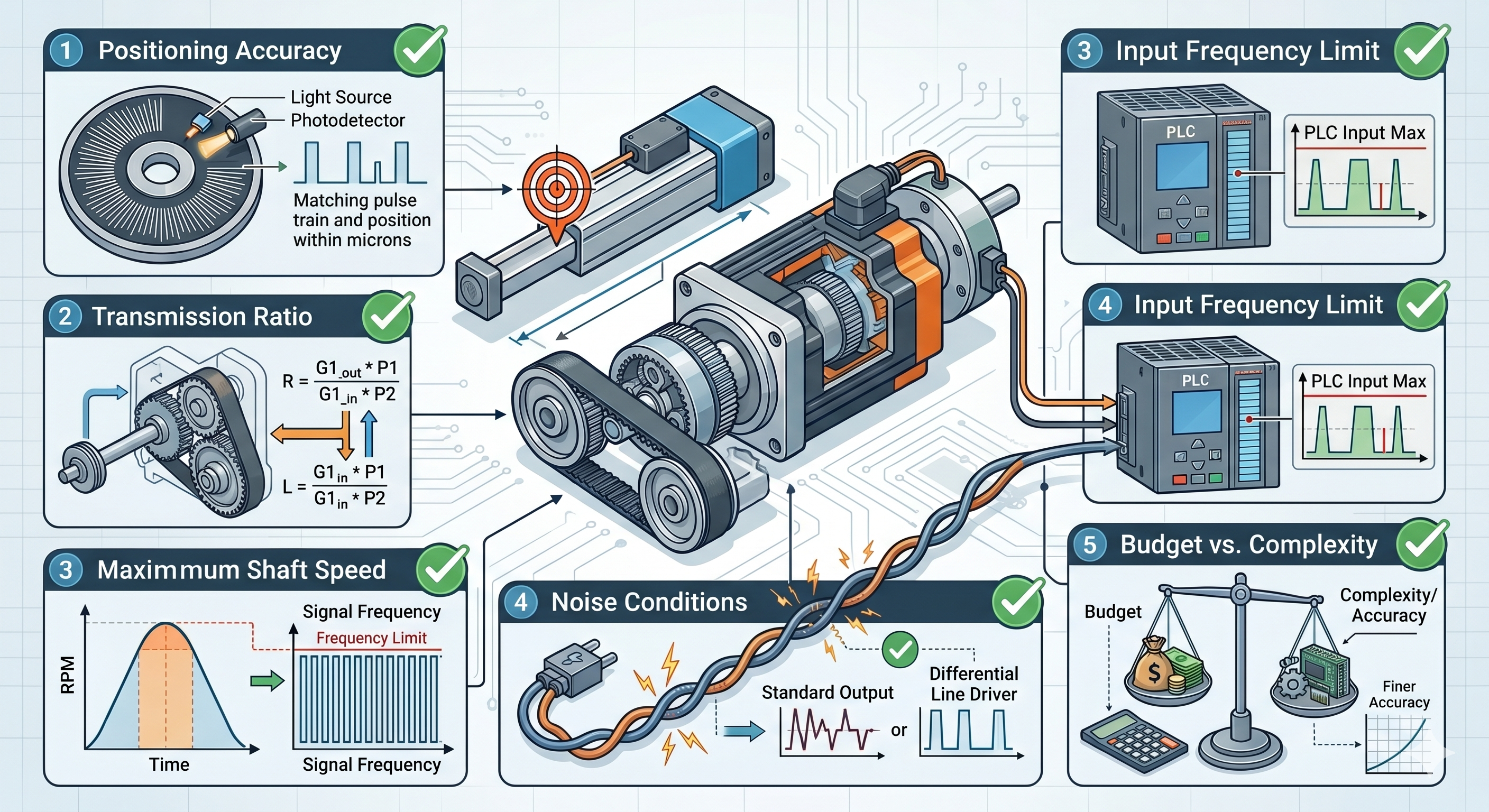
Before the final order, I always run the project through this checklist to ensure everything is taken into account correctly:
- Positioning accuracy. I check whether the pulse pitch matches the required positioning accuracy of the mechanism;
- Transmission ratio. I take into account all gearboxes and pulleys between the encoder shaft and the actuator;
- Maximum shaft speed. I calculate the maximum signal frequency at peak speed to ensure I don't exceed the electronics' capabilities;
- Input frequency limit. I compare the encoder frequency with the input characteristics of my PLC or frequency converter;
- Noise conditions. I evaluate the cable length and noise level to select the correct output signal type;
- Budget vs. complexity. I weigh whether the increase in accuracy justifies the increased complexity of setup and the increased cost of the processing modules.
Final Advice from the Field
My main experience is that any attempt to compensate for mechanical problems with electronics is a recipe for endless failure. You must clearly understand that excessive encoder resolution will never correct gearbox play, bearing wear, or belt slippage on a pulley. If your controller is physically incapable of reading a high-frequency signal at full speed, then it doesn't matter how expensive or high-quality the encoder is. In real-world field conditions, I would always prefer a clean and stable signal at low resolution to a choppy and noisy data stream at high resolution.
FAQs About Encoder Resolution
1. How many PPRs do I really need?
I always calculate the minimum required encoder PPR based on the mechanics and required accuracy of the system, then add a margin of 2-4 times. This is enough to ensure stable operation of the control loop without overloading the controller's input stages with unnecessary noise.
2. Is higher resolution always better?
No, because excessive pulses per revolution in the encoder don't correct mechanical play or bearing wear, but it does significantly overload the processor. In the field, I often see systems with moderate resolution operating much more accurately and stably than overly complex designs.
3. Can too much resolution cause problems?
Absolutely, since too much detail makes the signal extremely sensitive to electromagnetic interference from frequency converters. Furthermore, on long cable runs, the wire capacitance begins to "round off" the edges of small pulses, leading to unpredictable counting errors.
4. What happens if my encoder frequency is too high?
If the signal frequency exceeds the physical bandwidth of the PLC input, you'll get unreliable speed data and a huge cumulative position error. In such cases, I have to either replace the encoder with a model with a lower PPR or install expensive high-speed counting modules.
5. How does quadrature affect resolution?
In quadrature mode, the controller analyzes both channels (A and B) and counts four signal edges instead of one. This allows me to effectively quadruple the incremental encoder resolution programmatically, without purchasing a new encoder or changing the system mechanics.