Mechanical and Electronic Alignment of an Encoder with a Servo Motor
23.12.2025
When engineers ask me how to align an encoder with a servo motor correctly and without risking the drive, I always answer the same thing: the magic is in the preparation. Over the years, as a field engineer, I've learned that properly aligning incremental encoder with a servo drive is what separates a stable, closed-loop system from unpredictable behavior, axis jitter, and constant positioning errors.
When the encoder is even a few degrees off-center, the system will still start, but the accuracy will drop, and the phasing will become noisy under load. Therefore, at every site where I install servo drives, I start with mechanical alignment, then check the signal phase, and only then apply power to the drive.
Here's what we'll discuss today:
- Why encoder alignment matters in servo applications
- Step-by-step encoder-to-motor mechanical alignment
- Signal phasing and electrical setup for correct feedback
- Tools you’ll need: oscilloscope, alignment jig, tuning software
- Common mistakes to avoid during installation
Why Encoder Alignment Matters in Servo Systems
When I take on a new project and see that the servo is poorly holding its position, 9 out of 10 times the fault lies not with the electronics, but with improper alignment of the encoder and the shaft. In a closed feedback system, the motor "trusts" only what the sensor tells it. The slightest misalignment, incorrect phasing, or a misaligned zero mark turns the circuit into a source of vibration.
If the encoder synchronization with the motor is disrupted, the following occurs:
- Parasitic oscillations in hold mode;
- Current surges during acceleration;
- Zero position drift;
- Commutator errors, including drive shutdown.
In real-world installations, I've seen more than once how just 0.05 mm of radial runout transformed a perfectly tuned servo into a "jerky" axis, impossible to use for precise positioning.
Closed loop vs open loop
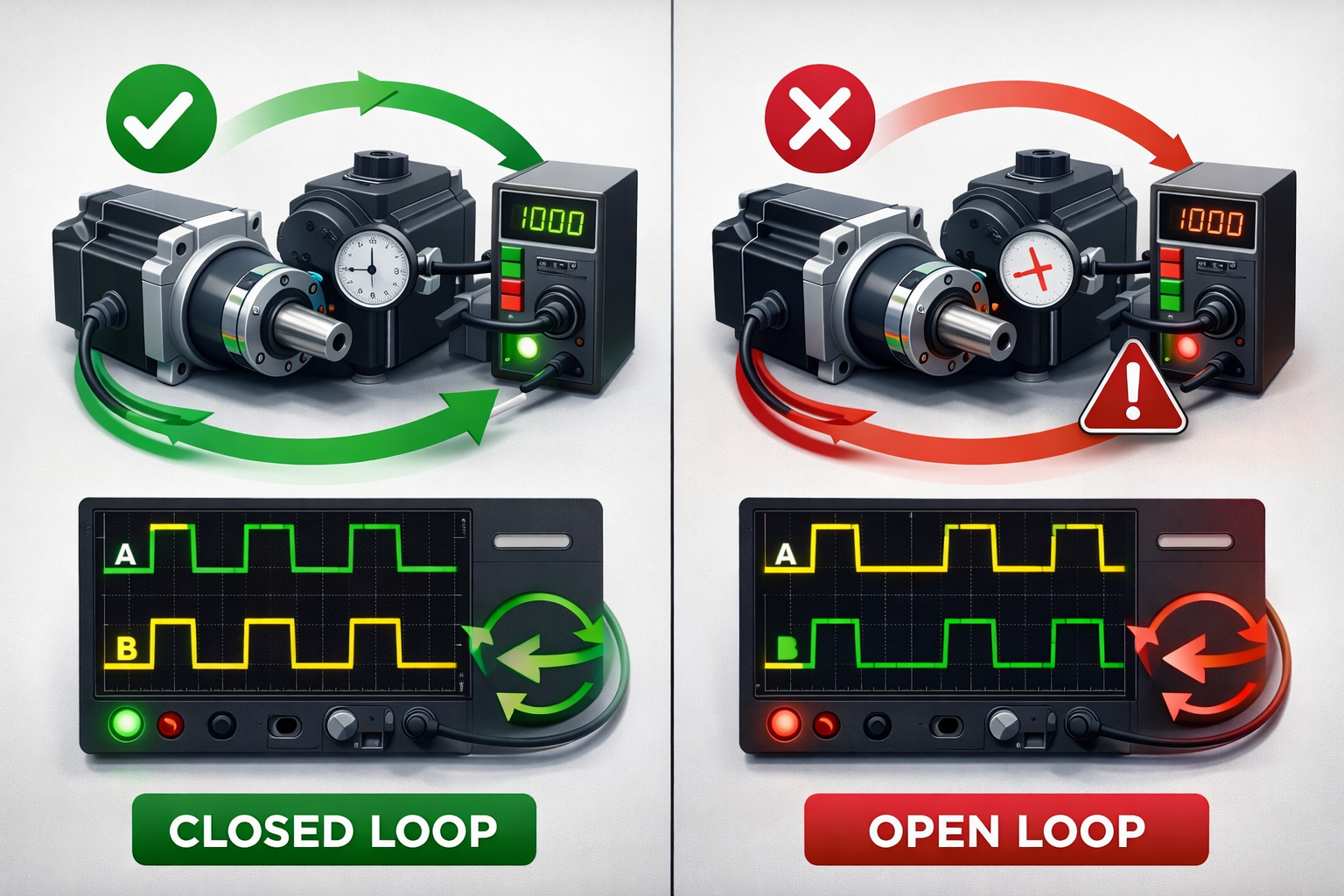
In open systems, encoder errors have a lesser impact, but in closed loops, where every microsecond of signal determines a control pulse, any problem in the servo motor feedback setup becomes critical.
I had a case in a packaging equipment production plant: the encoder was mounted correctly, but the A/B phasing was reversed. As a result, the axis deflected when the servo was engaged – the drive compensated in the opposite direction.
I corrected the direction, and the axis immediately became stable.
Mechanical Alignment – Mounting the Encoder
During mechanical installation, it's important to achieve perfect alignment of the encoder and shaft. This step affects bearing life, signal quality, and positioning accuracy.
Here's a basic encoder installation guide:

- Align the encoder and motor axes without radial misalignment;
- Avoid axial interference, as this is a common cause of index drift;
- Check for runout using a dial indicator;
- Fix the anti-rotator without preload;
- Indicate a zero mark if provided by the manufacturer.
Be especially careful with flexible couplings. They compensate for misalignment, but if the misalignment exceeds 0.1-0.15 mm, parasitic vibration occurs, which interferes with encoder synchronization with the motor and causes drift.
Electrical Phasing – Matching Encoder and Motor Signals
Electrical alignment is the most important step. Even a perfectly installed encoder will malfunction if the phasing is incorrect.
What I check first:
- A/B phase order: the direction of rotation should match the direction in the drive;
- Signal levels: amplitude, symmetry, absence of chatter;
- Z index: should match the mechanical zero;
- Filtering: interference often causes false transitions.
When I install an encoder on a system with a PMSM, the first step is to rotate the motor manually and check the A/B phases on an oscilloscope. This saves hours because it immediately shows whether the servo encoder phasing is correct.
With absolute encoders, the procedure is different – it's important to complete the absolute encoder alignment steps: set the multi-turn and single-turn angles, set the zero position, and confirm it in the software.
Step-by-Step Encoder Alignment Procedure
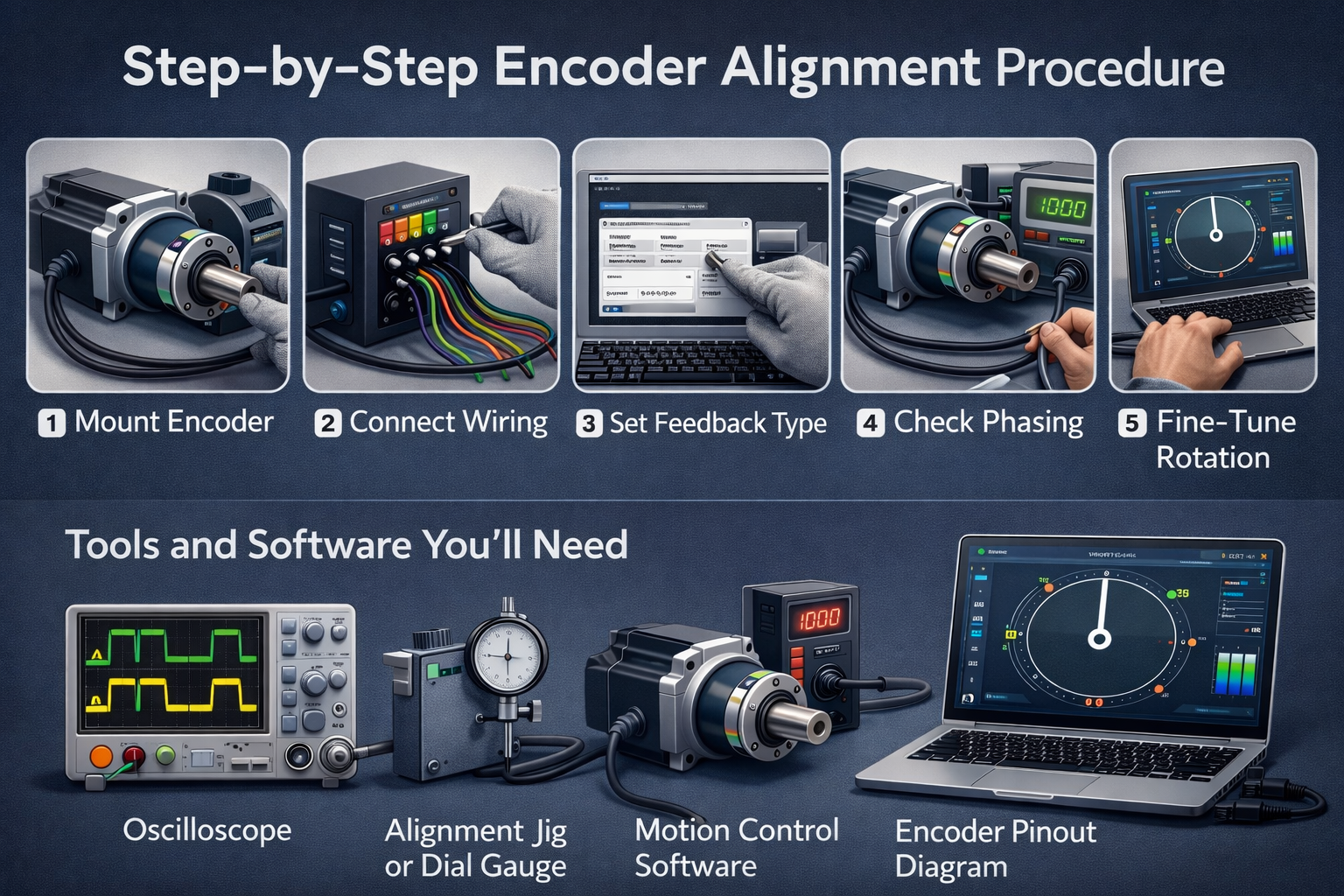
If you're working with an encoder, this step is also called. Here's how aligning the incremental encoder process goes on real objects:
- Mount the encoder and secure mechanically;
- Connect wiring to the drive/controller;
- Set encoder resolution and feedback type in software;
- Rotate the shaft manually to test signal phasing;
- Align index pulse to motor zero (if needed);
- Run a low-speed test rotation and fine-tune.
Tools and Software You’ll Need
Here's a list of what I always take on-site:
- Oscilloscope (minimum two-channel);
- Alignment jig or dial gauge;
- Motion control software (e.g., Siemens, Allen-Bradley, etc.);
- Pinout diagram for the encoder.
It's worth noting that high-quality motion control encoder alignment is almost impossible without an oscilloscope.
Common Alignment Problems (and How to Fix Them)
In the field, typical errors recur repeatedly.
- Drive faulting on power-up
When a drive detects an error immediately after power-up, it's almost always due to a mismatch between the encoder and the motor. If the encoder zero is offset or the A/B phasing doesn't match the controller settings, the drive perceives the actual rotor position as invalid. I've encountered this after encoder replacement or reassembly: even a small misalignment of a few degrees can cause an emergency shutdown. In such cases, I disconnect the power circuits, check the signal direction on an oscilloscope, manually align the encoder using the mechanical zero and Z index, and then restart the system.
- Erratic motion or overshoot
Erratic motion or sudden overshoot occurs when the encoder transmits incorrect speed or angle values. This is often due to misalignment in the mechanical mounting or slight misalignment in the coupling, which creates the illusion of vibration or wobble in the drive. In the field, I always check the axial and radial clearance, ensure the encoder is installed correctly, and that there is no misalignment. After correcting the mechanical alignment, the motion stabilizes, and the system begins to respond accurately to controller commands.
- Index pulse drift
Index pulse drift occurs during repeated positioning or homing cycles. The motor returns to slightly different positions, accumulating error. The cause is a mismatch between the motor's mechanical zero and the encoder's Z-pulse. I resolve this in several steps: I set the motor to the physical zero, align the index pulse with this position, secure the encoder, and check the repeatability of several cycles. Sometimes, I have to adjust the coupling or change the mounting method if the drift persists.
- Encoder signal noise or dropout
Noise or dropouts in the A/B/Z signals cause short-term interruptions or sporadic encoder errors. In the field, cables are most often the culprit: they are laid near power lines or have poor shielding. Low-quality connectors and a lack of reliable grounding exacerbate the problem. I always check the cable routing, move it away from sources of interference, and replace connectors if necessary. After this, the signals stabilize and the errors disappear.
Final Tips from the Field

Here are some recommendations that will simplify servo loop encoder tuning:
- Always double-check A/B phasing before enabling the drive. Checking the phasing of the A and B signals is the first and most important thing I do before enabling the drive. Even a small phasing error can cause the motor to move backwards or cause unpredictable system behavior. I usually use an oscilloscope or a built-in tool in the drive software to ensure the phases match the expected direction. This saves hours of troubleshooting problems related to incorrect encoder positioning.
- Label your signal wires – especially Z. Labeling your encoder wires, especially the Z index, helps avoid confusion during wiring and subsequent testing. In the field, you often have to quickly reconnect cables, and without clear labeling, it's easy to confuse signals. I always use color-coded tags and write the phase numbers on the insulation. This simplifies diagnostics and speeds up installation, especially on complex systems with multiple drives.
- Don't skip the mechanical runout check – even small offsets matter. Checking the shaft runout and encoder installation concentricity is critical for accurate positioning. Even small radial or axial misalignments can cause index drift, signal noise, or jerky movement. In the field, I use a dial indicator or a calibrated coupling to ensure the shaft is level. This small additional effort during installation saves a huge amount of time on system setup and prevents premature equipment wear.
FAQs on Encoder and Servo Motor Alignment
1. Do I need to align an encoder for an absolute servo system?
Yes, even absolute encoders require checking the mechanical zero and phasing, especially if the device has recently been replaced or moved. Despite maintaining the position in memory, a misaligned Z index or housing movement can cause startup and positioning errors.
2. What happens if my encoder is 180° out of phase?
If the A/B phases are reversed, the drive will move in the opposite direction or experience constant positioning errors. In some systems, startup crashes are possible. This can be corrected by changing the phasing in the driver settings or reconfiguring the wiring on the encoder.
3. Can I auto-tune the servo without aligning the encoder first?
No, auto-tuning a drive without proper encoder synchronization results in incorrect gain adjustments, excessive vibration, and inaccurate positioning. I always check the mechanical zero and phasing before auto-tuning.
4. What's the safest way to test encoder phasing?
The safest method is to rotate the shaft manually with the power circuit disconnected and observe the A/B/Z signal on an oscilloscope or in diagnostic software. This allows you to check the phase direction and whether the Z signal matches the zero point without risking damage to the drive or load. Once confirmed, you can turn on the power and perform slow test movements.